HP Wolf Cloud Endpoint Manager

An enterprise control plane that helps IT teams enroll, govern, monitor, and remediate distributed HP Thin Client fleets, from ten devices to ten thousand.

OutcomeA scalable operating model that makes fleet health, action scope, and downstream consequences visible before administrators commit changes.
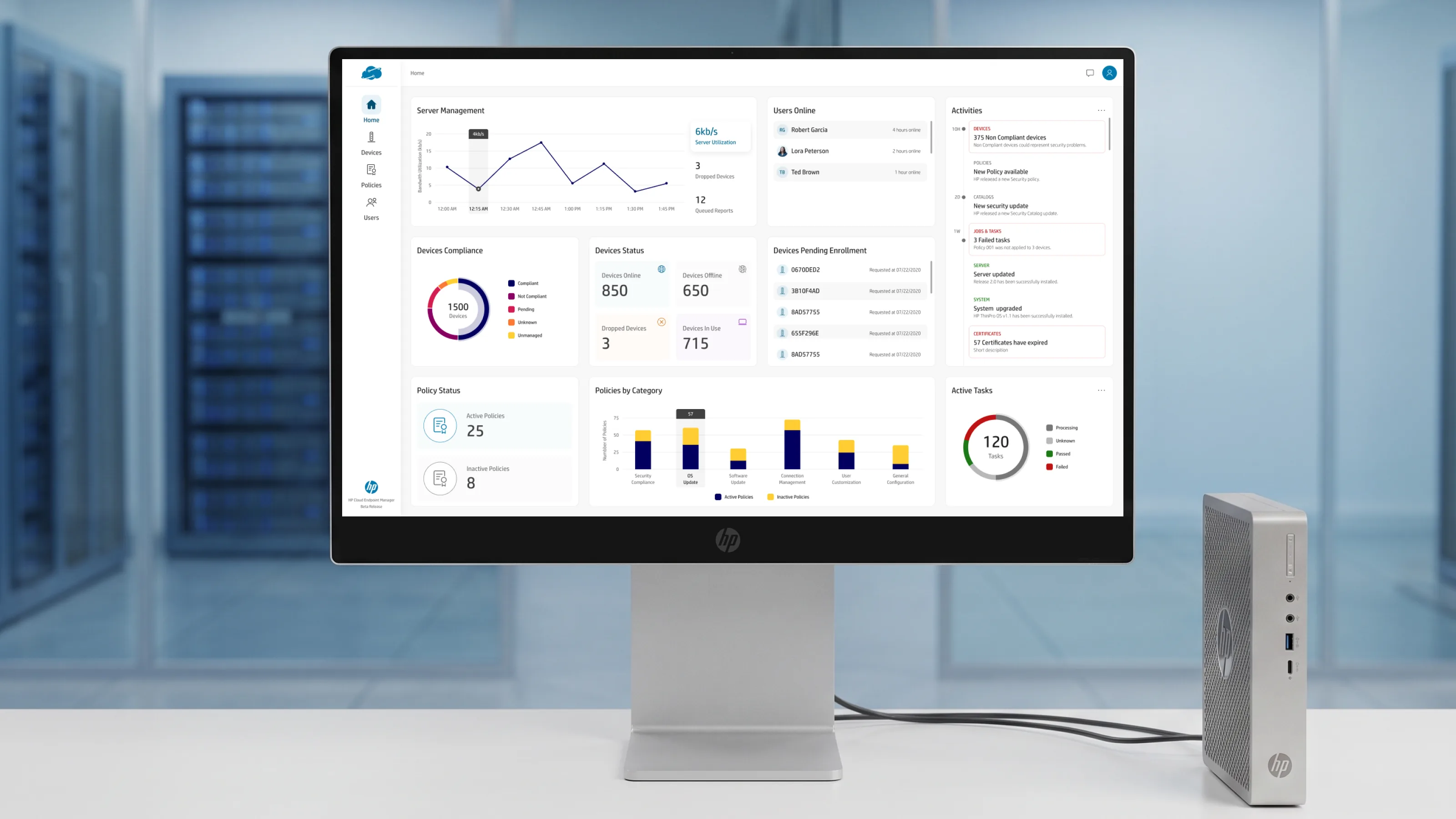
HP Wolf Cloud Endpoint Manager, the Home dashboard shown on an HP monitor beside an HP thin client, in a data-center setting.
Role
Senior Product Designer
Engagement
Direct engagement
Client
HP
Scope
End-to-end Product Design | 0 → 1
Status
Live

The Product Problem

Enterprise administrators may be responsible for a retailer's checkout kiosks, a hospital's clinical workstations, or a call center's thin-client floor: heterogeneous hardware, different operating-system versions, policies, permissions, and compliance conditions distributed across many locations.

At small scale, almost any administration interface can appear manageable. At enterprise scale, the same interaction can affect hundreds or thousands of endpoints. The product had to make powerful fleet-wide action fast without allowing its consequences to become invisible, while giving HP a configuration model that could keep expanding without creating a new workflow for every capability.

  • Operational Clarity
  • Safe Bulk Action
  • Extensible Configuration
  • Visible Dependencies

Product Strategy

I approached the console as an operational control plane rather than a collection of administration screens. Three principles shaped the system: show administrators what requires attention, expose impact before consequential action, and scale capability through reusable product models.

That strategy created productive constraints across the product: an opinionated dashboard that could adapt without becoming a blank canvas; fast drag-and-drop that could not silently change access; conflict resolution that worked for two policies or two hundred; and configuration patterns that could absorb new capability without multiplying the behaviors administrators had to learn.

System Evidence

The architecture spans device discovery and enrollment, policy authoring and versioning, reusable configuration templates, user and role administration, and fleet-wide compliance monitoring. The numbers below are implementation evidence for the product strategy—not the outcome by themselves.

10→10k
Enterprise fleet control. One management model designed to remain legible as deployments grow.
0 silent changes
Safe bulk operations. Consequential cross-scope actions reveal their impact before execution.
15+ categories
Extensible configuration. Device capabilities share one predictable interaction model.
1 source of truth
Reusable policy architecture. Templates stay shared while downstream relationships remain visible.

Information Architecture

The console organizes around the objects an admin actually reasons about, devices, policies, templates, users, not around the backend's data model. Policies and templates are deliberately separate object types with a reference relationship between them, because that separation is what makes reuse safe and blast radius visible. Six primary surfaces, each with its own density and default opinion, calibrated to the job it does rather than to a single global layout.

HOMECommand center · customizable
Compliance & security cardsFleet statusActivity feed

An opinionated default that ranks compliance and security above vanity metrics, every card reorderable, hideable, resizable, so it fits a kiosk fleet and a hospital equally.

DEVICESInventory · groups · detail
Dynamic / Manual / Imported groupsDevice listDevice specification

A permission-scoped group hierarchy with drag-and-drop, plus a per-device detail view spanning spec, capacity, BIOS, OS, and applied-policy state.

POLICIESAuthoring · versioning · scope
Policy libraryConflict resolutionScope assignment

The compliance engine, authoring, drafts, versions and life-cycle, side-by-side conflict resolution, and a category-first view of what a policy actually does to the fleet.

TEMPLATESReusable objects · composability
Template libraryScript / registry / BIOS / softwareAssigned policies

Standalone, reusable configuration objects referenced by, not copied into, the policies that use them, with an assigned-policies list that surfaces blast radius before an edit.

USERSLocal / domain · roles
User directoryFolders & rolesStatus lifecycle

Local and domain users organized into folders, with roles and an explicit account-status lifecycle (active, pending, locked) rather than a single opaque flag.

DEVICE CONFIGOne pattern · 15+ categories
Toggle-gated categoriesInline tablesConsistent add / remove

The reusable primitive underneath policy and device configuration, one pattern flexible enough for a single toggle and a multi-field BIOS form, used everywhere so the surface reads as one coherent product.

Design Decisions at Scale

Six decisions, one per core surface, chosen because each is a place where the easy answer and the right answer diverge, and the gap between them is where senior-level design actually lives. Each names the problem, the constraint it had to satisfy, the alternative I rejected, and how it holds up at fleet scale.

D1

The Home dashboard is a flexible card model, not a static page

Different IT orgs, retail kiosks, hospitals, call centers, care about wildly different signals, so a fixed dashboard is wrong for most of them. The constraint was to flex priority, density, and content per org without becoming a blank-canvas widget board an admin has to assemble on day one. I rejected the fully drag-and-build BI approach: technically flexible, but too much setup burden for a first-run experience. The default view is opinionated, compliance and security ranked above uptime and counts, and every card is reorderable, hideable, and resizable, so power users rearrange without ever hitting an empty state.

D2

Drag-and-drop that can never make a silent, irreversible mistake

Nested, permission-scoped device groups are powerful and dangerous, moving one folder can silently change access for hundreds of devices. Drag-and-drop had to feel fast for power users while making an irreversible mistake structurally unable to happen quietly. I rejected auto-resolving scope conflicts by policy precedence: faster, but it removes the admin's chance to catch a mistake before it ships. Every cross-scope move (public ↔ private) raises a specific, legible confirmation, "move group X under Y", so there are zero silent state changes.

D3

Policy conflict is the main case, not the edge case

Two policies applied to overlapping devices will disagree eventually, at fleet scale that isn't a rare failure, it's inevitable. The resolution UI had to work whether there were two conflicts or two hundred, without forcing row-by-row review every time. I rejected a simple last-write-wins merge: technically simplest, but invisible and untrustworthy for security-sensitive work. Admins resolve bulk conflicts in a single action via one side-by-side resolution, then drop into per-category detail (Connections, Devices, Time & Language, Device Settings) only where it actually matters.

D4

A permission graph, translated into something a human can reason about

The underlying policy model, scopes, overrides, inheritance, is a graph, not a list, and most admins should never have to think in graph terms. Every policy had to answer "what does this actually do to my fleet?" without a support ticket or an engineer's help. I rejected exposing the raw scope/override tree: accurate, but unreadable for 90% of admins. Instead, a category-first view maps to how IT teams actually think about configuration, security vs. connections vs. device settings, with one-click drill into applied groups and applied devices.

D5

One configuration pattern that scaled across 15+ categories

Fifteen-plus configuration categories, each with different fields, needed to feel coherent rather than like fifteen bespoke screens. The abstraction had to be flexible enough for a single toggle (Wireless) and a multi-field form (BIOS) without forking the pattern. I rejected bespoke layouts per category: faster to ship one screen, but increasingly expensive to learn, design, implement, and test as the product grows. One documented toggle-and-table pattern, enable-gate at the top, inline-editable table beneath, consistent add/remove, turns many new capabilities into structured content and validation work instead of an unrelated workflow.

D6

Reusable templates that surface their blast radius before you edit

Reusable templates are only safe if admins can see the consequence of changing one before they do it. The product needed real composability, write once, use everywhere, without creating a silent-update landmine across dozens of policies. I rejected copy-on-use templates, where each policy gets its own snapshot: safer in isolation, but it defeats the entire point of a reusable template. Templates exist as standalone objects (script, registry, BIOS, software), referenced rather than copied, and an "Assigned Policies" list makes every policy a template feeds into visible before the edit is committed.

Outcome

  • Established one operating model for device discovery, enrollment, policy authoring, configuration, compliance, remediation, templates, and user administration.
  • Made the scope and consequence of high-impact actions visible before administrators commit fleet-wide changes.
  • Consolidated more than 15 device-configuration categories into a shared interaction model that can absorb new capabilities without adding an unrelated workflow each time.
  • Preserved reusable templates as shared objects while exposing the policies and devices affected by a change.
  • Delivered the end-to-end design for HP's shipped cloud endpoint-management console.

The deeper outcome was not simply a more consistent interface. It was a product architecture capable of absorbing additional complexity without passing that complexity directly to the administrator.

Home, The Command Center

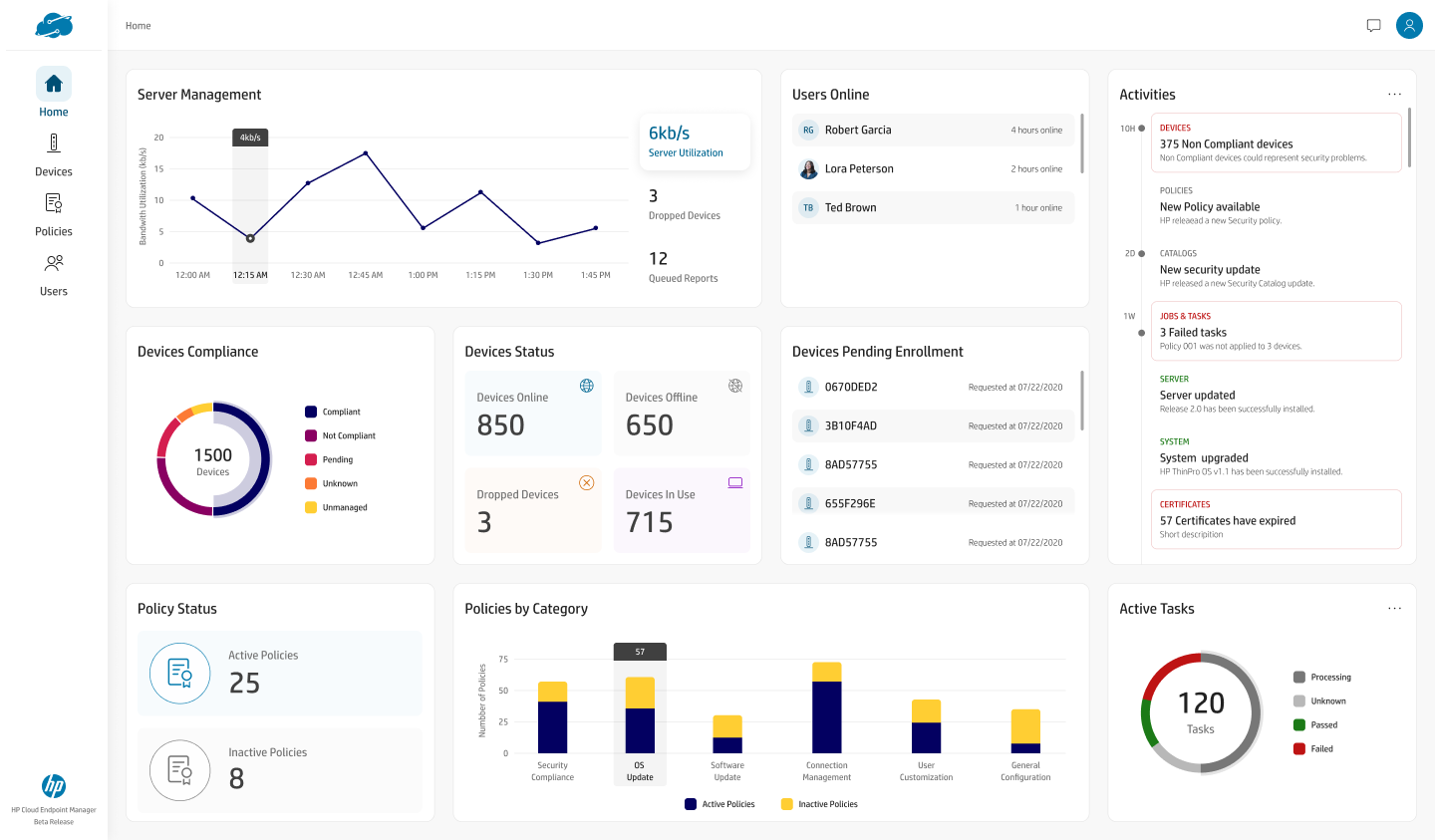
The console's landing surface, and the one screen most likely to differ org to org. Designed for information hierarchy at scale, an opinionated default that stays useful from a ten-device pilot to a ten-thousand-device fleet.
Module 1 of 5 · Dashboard
Home Dashboard
Compliance and security cards ranked above vanity metrics, a fleet-wide activity feed, and per-category policy and task status, every card reorderable, hideable, and resizable.
CustomizableInfo hierarchy
HP Wolf Cloud Endpoint Manager home dashboard showing server management, device compliance donut reading 1500 devices, device status, devices pending enrollment, policy status, policies by category bar chart, and an active tasks gauge.

design rationale, M1 · Designing for information hierarchy at scale

1
Compliance & security cards are ranked above vanity metrics. Uptime and device counts are pushed down; what an admin is accountable for, non-compliant devices, security posture, leads the page.
2
Every card is user-customizable, reorder, hide, resize. The default is opinionated, but no org is locked into it.
3
The layout holds from 10 devices to 10,000 without a redesign. The problem: retail kiosks, hospitals, and call centers care about wildly different signals, so a fixed dashboard is wrong for most of them. The constraint was a set of cards, priority, density, and content flexing per org, not a page.
4
A fully drag-and-build dashboard was rejected. Like a BI tool, it's technically flexible but too much setup burden for a day-one admin. The default view is useful out of the box; power users rearrange without ever hitting an empty state.

Devices, Groups & Device State

The fleet inventory and its per-device detail. Handling structural complexity, nested, permission-scoped groups, without dumbing it down, and without ever letting a fast interaction cause a silent, irreversible change.
Module 2 of 5 · Device Inventory
Device List, Groups & Drag/Drop
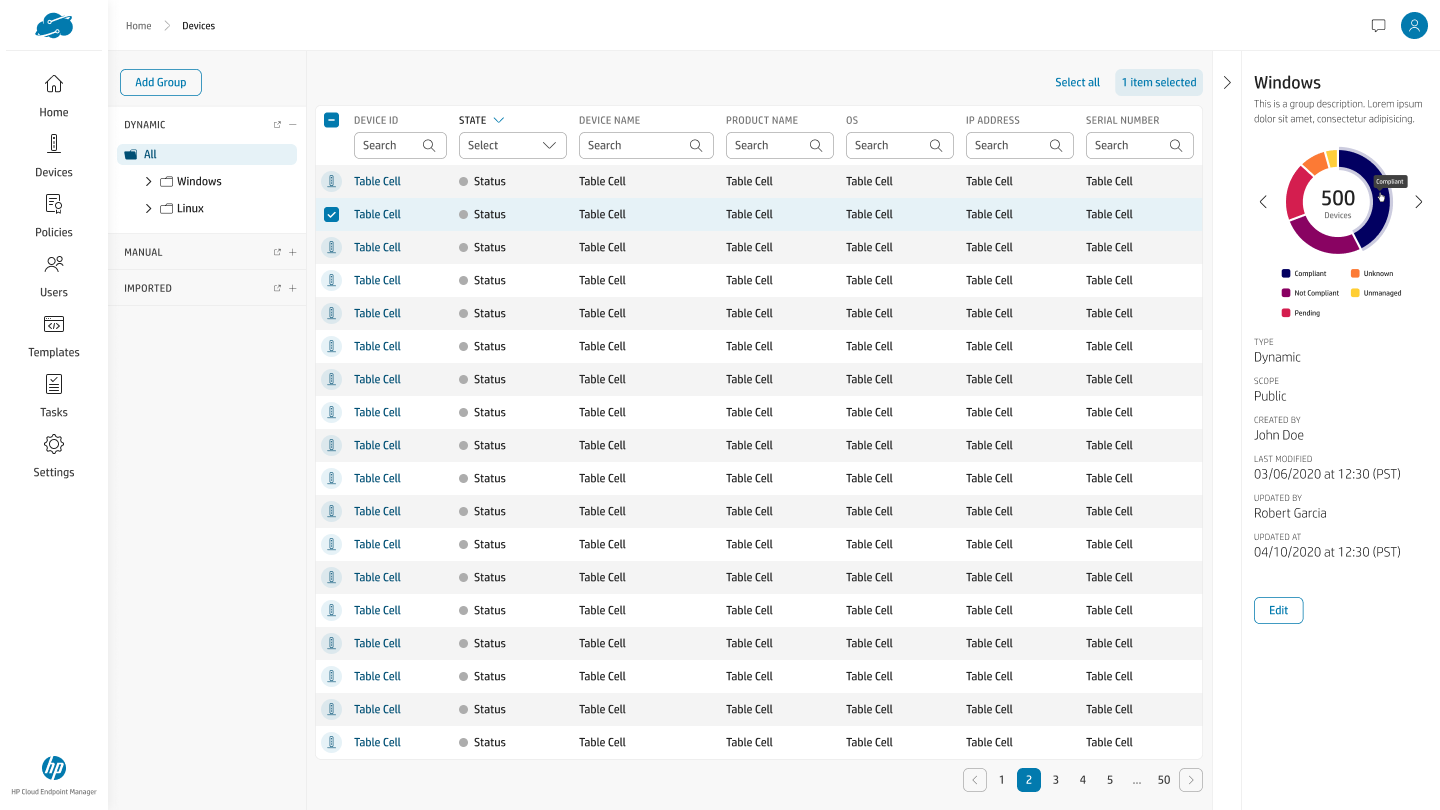
A public/private group hierarchy (Dynamic, Manual, Imported) on the left, a sortable device table in the center, and a group-detail panel on the right, drag-and-drop to move, Ctrl-drag to copy.
Group hierarchyDrag/Drop
Device list with a Dynamic/Manual/Imported group tree on the left, a device table with device ID, state, name, product, OS, IP, and serial columns in the center, and a group detail panel on the right showing a compliance donut of 500 devices and metadata.
Module 2 of 5 · Device Detail
Device Detail, Specification & State
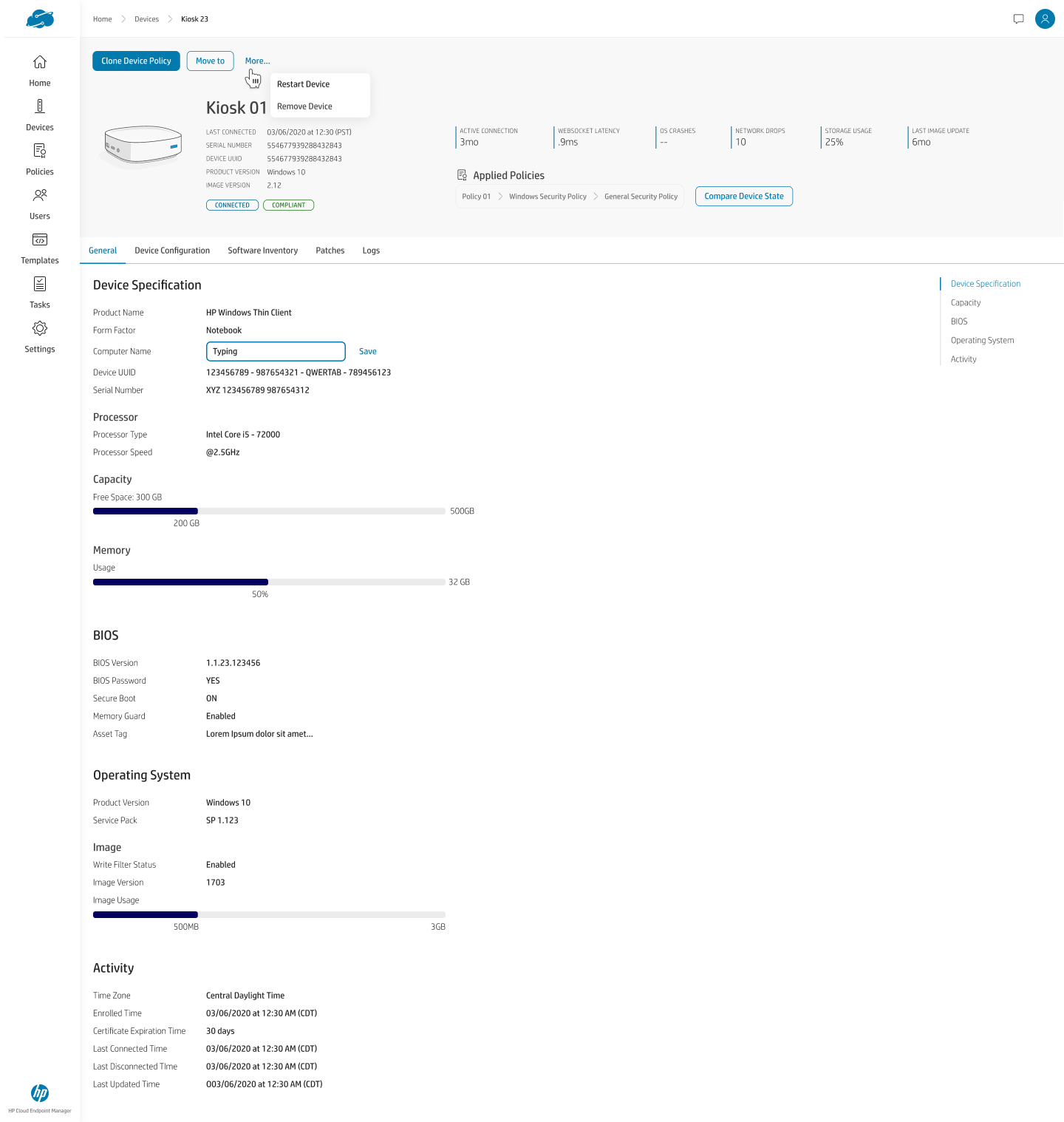
Per-device view spanning specification, capacity, BIOS, operating system, and activity, plus applied policies shown as a chain and a "Compare Device State" action for drift.
Device stateApplied policies
Device detail for Kiosk 01 showing connected and compliant status, live metrics, an applied-policies chain, a More menu with Restart and Remove actions, and tabbed device specification, capacity, BIOS, operating system, and activity sections.

design rationale, M2 · Handling structural complexity without dumbing it down

1
Public/private group hierarchy with drag-and-drop to move or copy. Ctrl modifies the drag to copy, matching a power user's muscle memory from the file managers they already know.
2
A scope-conflict warning fires when moving public ↔ private groups. The dangerous moves are flagged before they happen, not audited after.
3
Any hierarchy-wide move requires an explicit, specific confirmation. The problem: nested, permission-scoped folders are powerful but dangerous, moving one folder can silently change access for hundreds of devices. The constraint was to keep drag-and-drop fast while never allowing an irreversible mistake to happen silently.
4
Auto-resolving conflicts by policy precedence was rejected. Faster, but it removes the admin's ability to catch a mistake before it ships. Every cross-scope move states exactly what it will do ("move group X under Y"), zero silent state changes.
5
Device detail exposes real state, not a green checkmark. Spec, capacity, BIOS, OS, and the applied-policy chain are all inspectable, and "Compare Device State" surfaces drift between intended and actual configuration.

Policies, Conflict, Scope & Configuration

The compliance engine, where the hardest UX problems live. Designing for the edge case that is actually the main case, translating a backend permission graph into something a human can reason about, and building one configuration pattern that scales across every category.
Module 3 of 5 · Policy Library
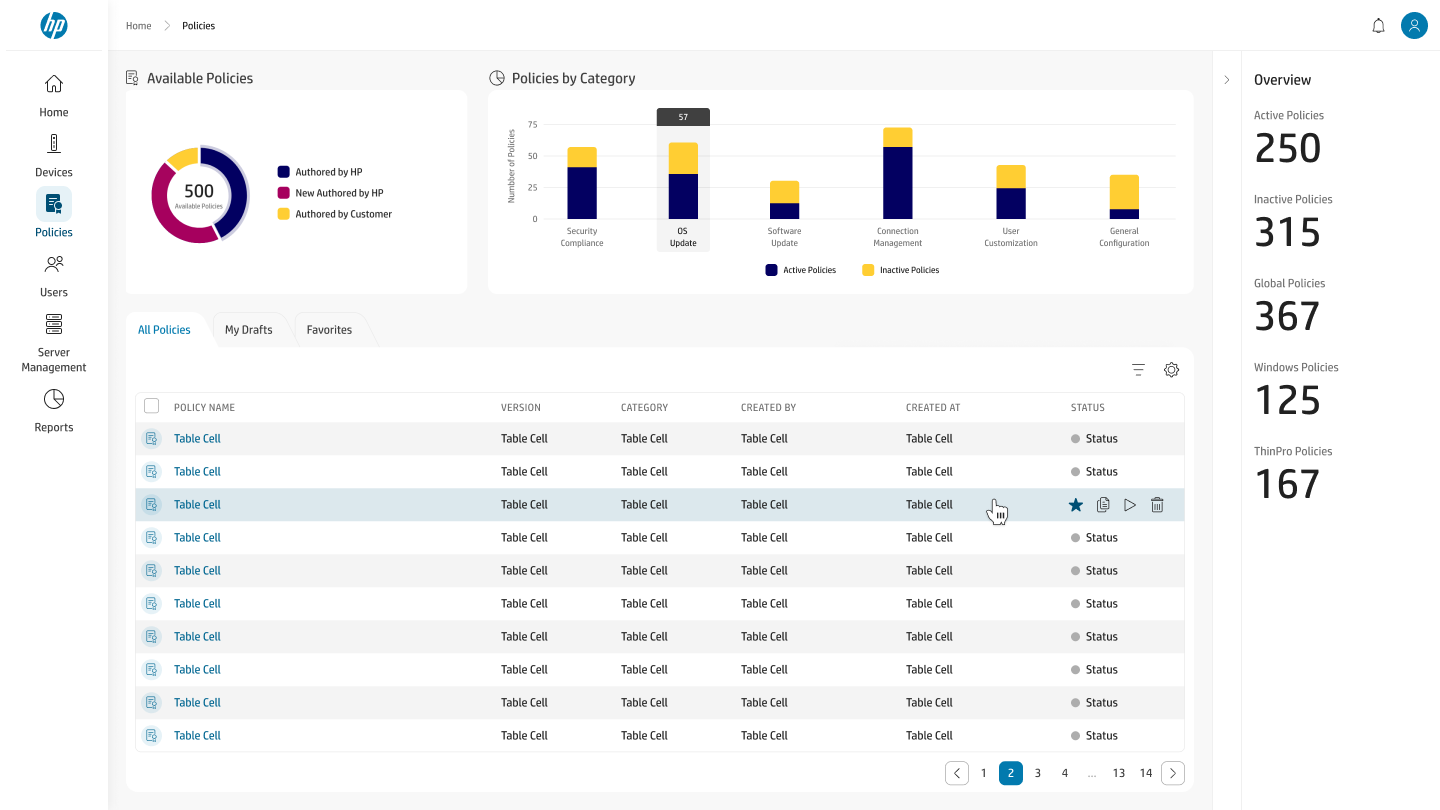
Policies, Library & Conflict Resolution
Available-policy breakdown, policies-by-category distribution, and a tabbed library (All Policies, My Drafts, Favorites) with version, category, author, and status per policy.
AuthoringVersioning
Policy library with an available-policies donut authored by HP, customer, and new-authored segments, a policies-by-category bar chart, a tabbed All Policies / My Drafts / Favorites table with hover actions, and an overview panel of active, inactive, global, Windows, and ThinPro policy counts.
Module 3 of 5 · Policy Detail
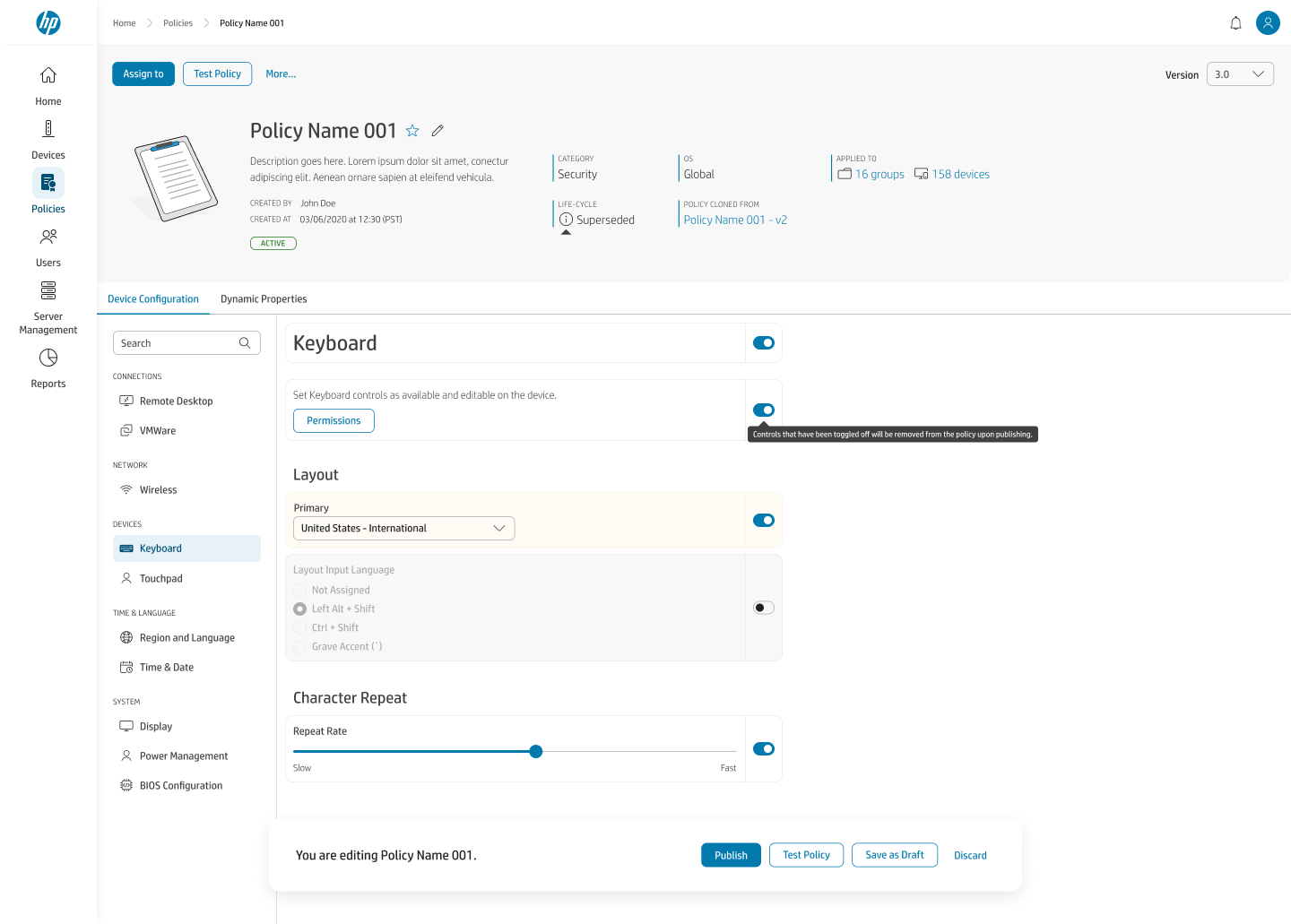
Policy Details, Scope & the Config Pattern
A policy header stating category, OS, applied groups and device counts, version, and life-cycle, over a Device Configuration tab whose category nav (Connections, Network, Devices, Time & Language, Device Settings) drives the reusable toggle-and-table pattern.
Scope assignmentToggle + table
Policy detail for Policy Name 001 showing category Security, OS Global, applied to 16 groups and 158 devices, life-cycle Superseded, version 3.0, and a Device Configuration tab with a left category nav and a toggle-gated Keyboard configuration including layout, input language, and character-repeat controls.

design rationale, M3 · Three decisions where the easy answer and the right answer diverge

1
Conflict resolution is built for the main case, not the edge case. Two policies on overlapping devices will disagree eventually, inevitable at scale. Side-by-side policy identification plus a conflict count lets an admin bulk-accept one policy's values in a single action, whether there are 2 conflicts or 200, then drop into per-category detail only where it matters.
2
A simple last-write-wins merge was rejected. Technically simplest, but invisible and untrustworthy for a security-sensitive workflow where a silent override is a real risk.
3
The policy header answers "what does this do to my fleet?" in plain terms. Live status, applied groups, and applied-device count, with one-click drill into Applied Groups / Applied Devices, the scope is broken out by functional category, not by the raw data model.
4
Exposing the raw scope/override tree was rejected. The underlying model (scopes, overrides, inheritance) is a graph, not a list, accurate to show directly, but unreadable for 90% of admins. A category-first view maps to how IT teams actually think about configuration: security vs. connections vs. device settings.
5
One toggle-and-table pattern absorbs 15+ configuration categories. An enable toggle gates the entire category (Wireless, Wired, Power, Display…); a table beneath shows saved profiles, editable inline, with Add/Remove consistent everywhere. One abstraction is flexible enough for a single toggle and a multi-field BIOS form without forking.
6
Bespoke layouts per category were rejected. Faster to ship one screen, but increasingly expensive to learn, design, implement, and test as the product grows. The documented pattern turns many additions into structured content and validation work instead of a new interaction model.

Templates, Reuse & Composability

Reusable configuration objects, scripts, registry keys, BIOS settings, software packages, designed for write-once, use-everywhere composability without becoming a silent-update landmine across dozens of policies.
Module 4 of 5 · Template Library
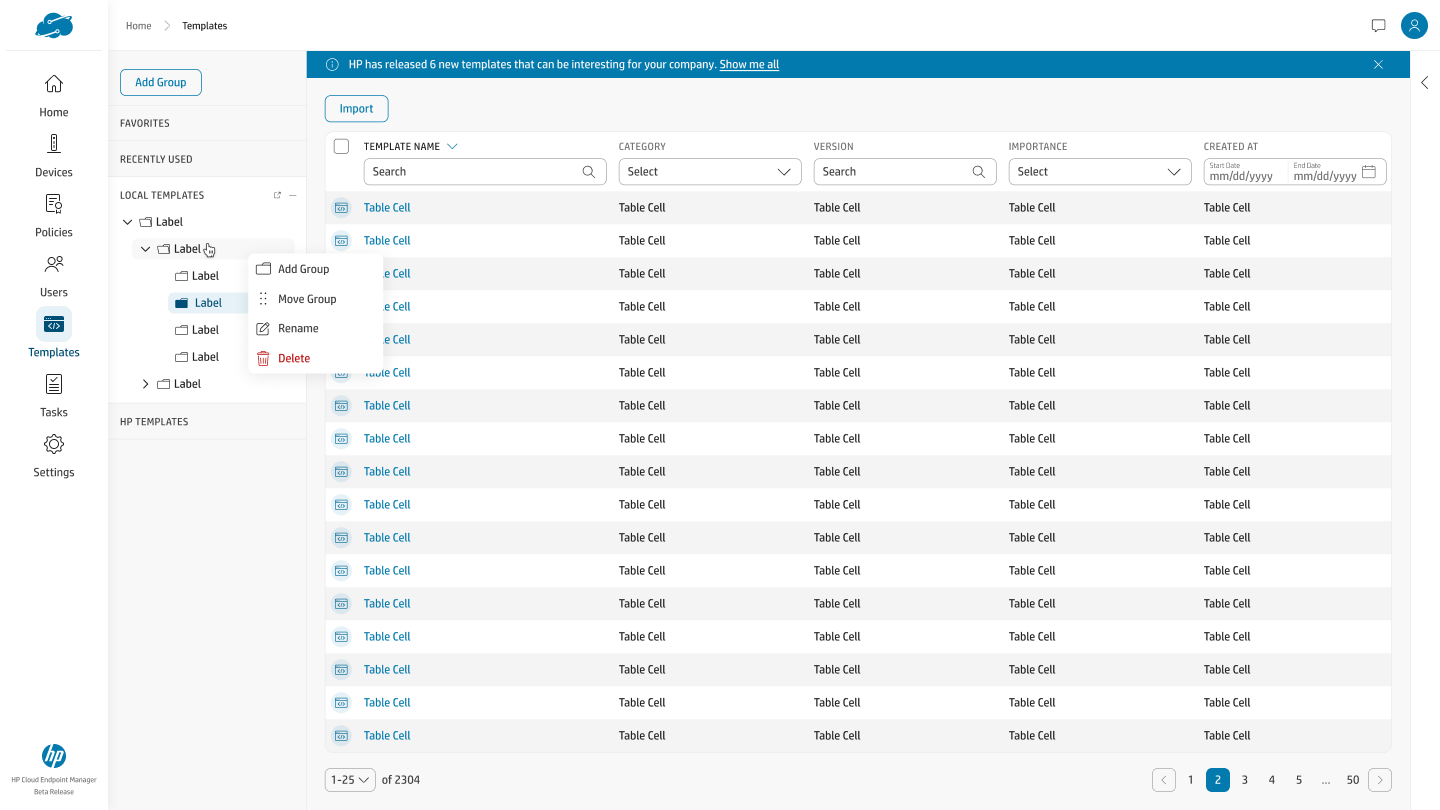
Templates, Library & Grouping
A grouped library of local and HP-authored templates with category, version, and importance, plus a nested group tree with add/move/rename/delete, templates as first-class, organizable objects.
Standalone objectsGrouping
Template library showing an HP new-templates banner, an Import action, a nested Local Templates group tree with a context menu offering add group, move, rename, and delete, and a table of templates with name, category, version, importance, and created-at columns.
Module 4 of 5 · Template Detail
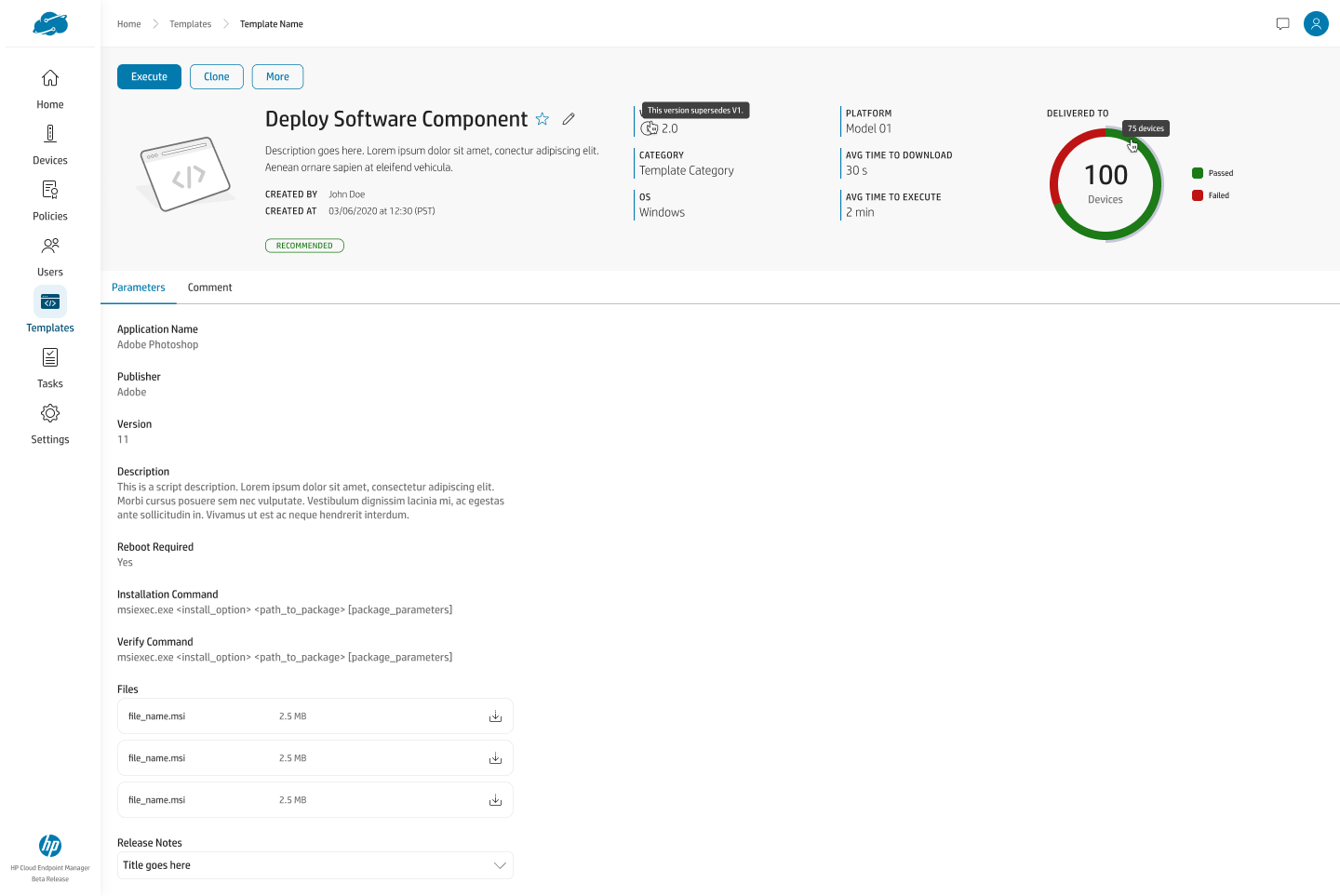
Template Detail, Read View & Blast Radius
A deploy-software-component template showing platform, category, version supersession, delivery success rate, and parameters, the read view an admin sees before touching anything.
VersionedDelivery metrics
Template detail for Deploy Software Component in read view, showing a version-supersedes note, platform, category, average time to download and execute, a delivered-to gauge reading 100 devices with passed and failed segments, and parameters including application name, publisher, version, commands, and files.
Module 4 of 5 · Template Detail
Template Detail, Edit & Parameters
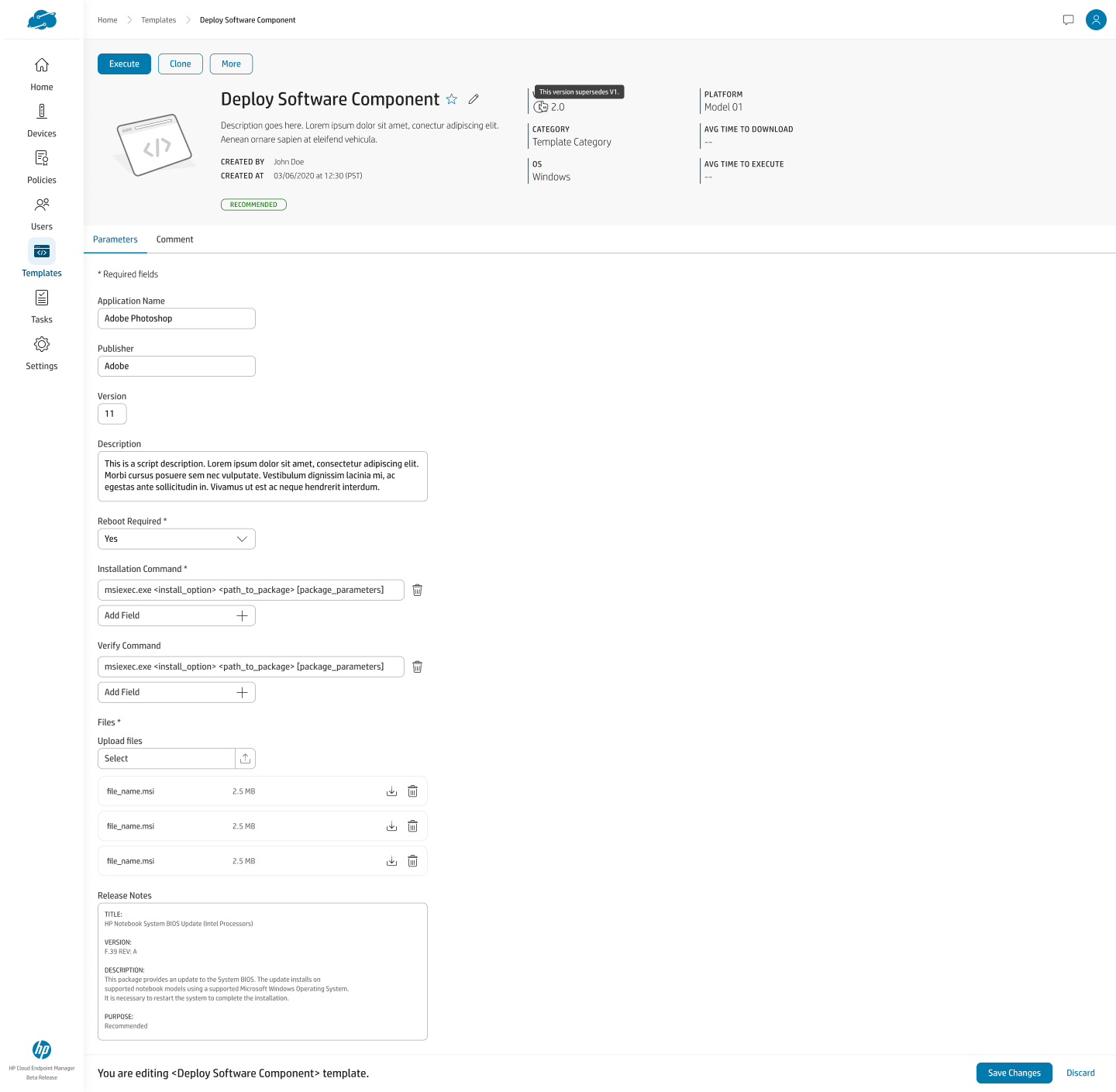
The same template in edit mode: required-field parameters, installation and verify commands with add-field affordances, file upload, and structured release notes.
Edit modeParameters
Template detail for Deploy Software Component in edit mode, showing required application name, publisher, and version fields, a reboot-required dropdown, installation and verify command fields with add-field buttons, a file upload area with existing files, and a structured release-notes block.

design rationale, M4 · Designing for reuse and composability

1
Templates exist as standalone objects. Script, registry, BIOS, and software templates are first-class, organizable, versioned things, not fields buried inside a single policy.
2
A template is referenced by, not copied into, any policy that uses it. One edit propagates everywhere it's used, which is the entire point of a reusable object.
3
An "Assigned Policies" list surfaces blast radius before editing. The problem: reusable templates are only safe if admins can see the consequence of changing one before they do it. The constraint was real composability, write once, use everywhere, without creating a silent-update landmine across dozens of policies.
4
Copy-on-use templates were rejected. Giving each policy its own snapshot is safer in isolation, but it defeats the entire purpose of a reusable template. Editing a template surfaces every policy it feeds into, so the ripple effect is visible before it's committed.

Users, Roles & Account Lifecycle

Administrator and user management, local and domain users organized into folders, with roles and an explicit account-status lifecycle rendered as first-class states rather than one opaque flag.
Module 5 of 5 · User Directory
Users, Directory & Status
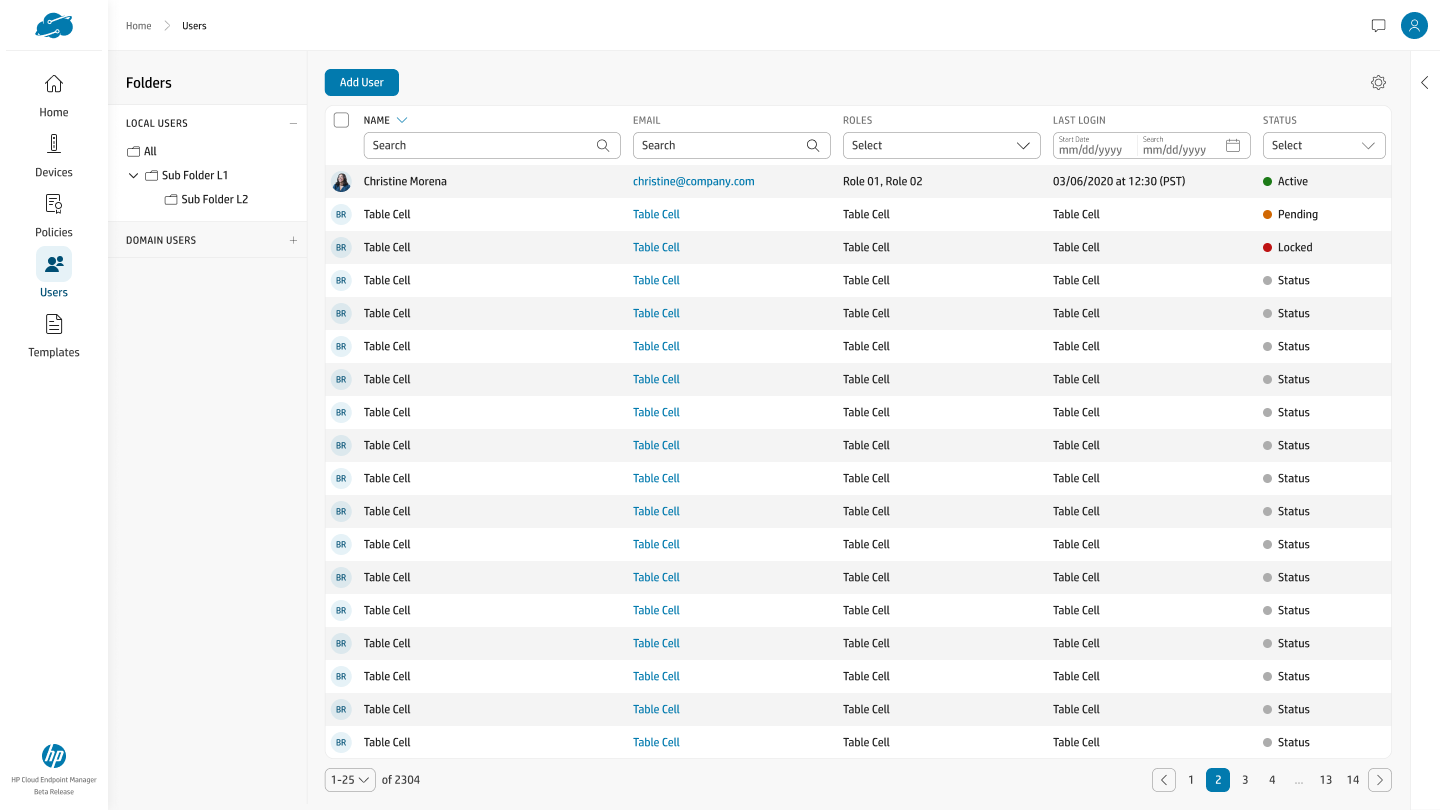
Local and domain users in a folder tree, with name, email, roles, last login, and an explicit status column, Active, Pending, Locked, surfaced as distinct, color-coded states.
FoldersStatus lifecycle
User directory with a Local Users folder tree containing nested sub-folders and a Domain Users section, an Add User action, and a table of users with name, email, roles, last login, and a status column reading Active, Pending, and Locked in distinct colors.
Module 5 of 5 · User Detail
User Detail, Profile, Roles & Security
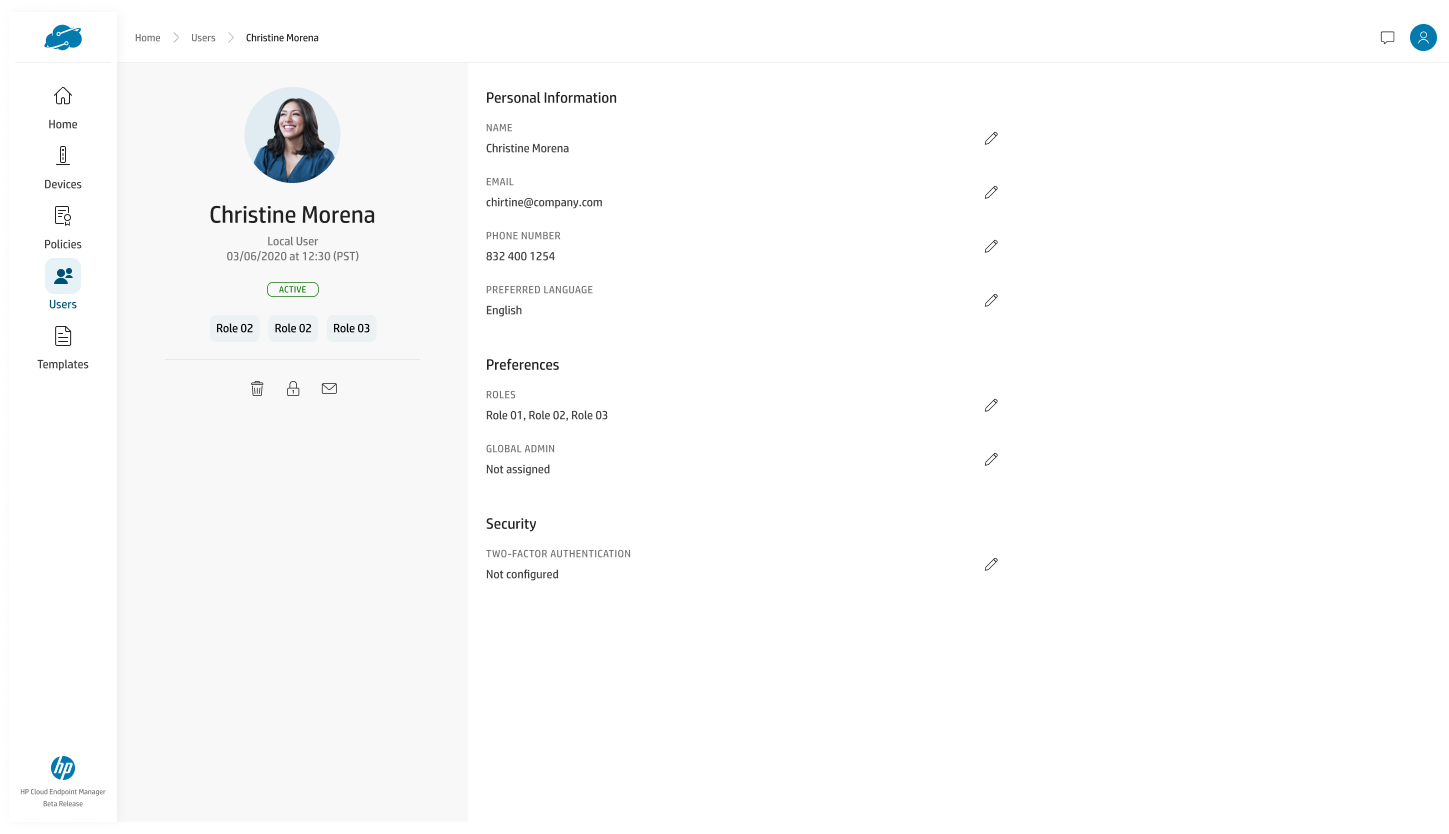
A single user's profile, roles, global-admin assignment, and security posture (two-factor status), with per-field edit affordances and account actions grouped on the profile card.
RolesSecurity
User detail for Christine Morena, a local active user, showing a profile card with role chips and delete, lock, and email actions, plus personal information, preferences with roles and global-admin fields, and a security section showing two-factor authentication not configured.

design rationale, M5 · Making account state legible

1
Account status is a first-class, color-coded lifecycle. Active, Pending, and Locked are distinct visible states, not a single opaque flag an admin has to decode from context.
2
Local and domain users share one directory, organized by folder. The same object model and interactions cover both identity sources, so admins don't context-switch between two mental models.
3
Roles and security posture sit on the same surface as identity. Global-admin assignment and two-factor status are shown alongside profile fields, so an admin auditing access sees privilege and protection together, not in separate screens.
Back to HP Wolf Cloud Endpoint Manager